Why gift ideas die in your Notes app
By Volodymyr Pavlenko ·
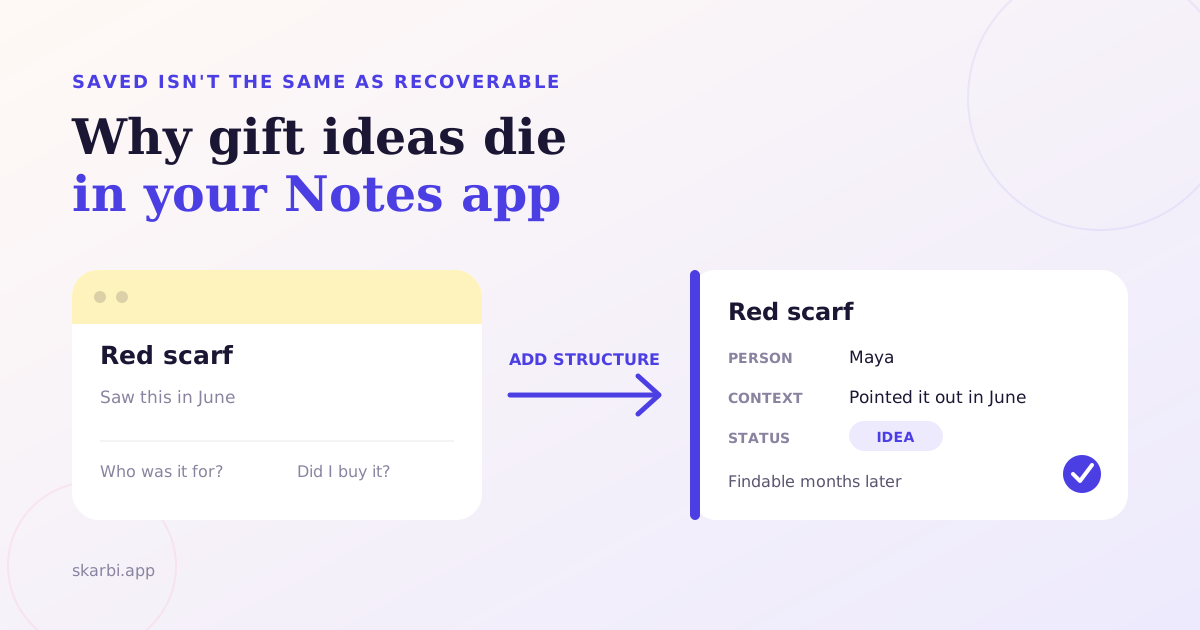
Apple Notes is excellent at catching a gift idea. That is exactly why so many ideas end up there and still fail you later.
You save a product link in March. In November, you search for “gift” and find six notes, three screenshots, and a line that says “green one.” The information exists. The meaning around it doesn’t.
The problem isn’t Notes. The problem is asking one blank page to handle capture, retrieval, planning, and history without defining any of them.
If you need a complete year-round method, start with the system for keeping track of family gift ideas. This article solves the narrower problem: making a note survive until you need it.
The short version
Notes is a strong place to capture gift ideas because it is fast, flexible, and already on your phone. A blank note still doesn’t require the person, the reason the idea mattered, or whether you used it. Those missing cues turn a saved idea into a memory test. You can rescue Notes with one folder, one note per person, and one clear rule for status. Move to a dedicated tool only when maintaining that structure becomes its own job.
Notes isn’t the villain
Notes deserves a fair defence. It opens quickly. It accepts text, web links, photos, scans, and checklists. You can pin important notes, organize them with tags, and build Smart Folders from filters.
Its search is also better than many people assume. Apple says Notes can search typed and handwritten text, tags, objects in images, and text inside scanned documents (Apple Support).
That is a serious capture and retrieval toolkit. For one partner, one child, or a short Christmas list, it may be all you need.
Free-form notes also match how small thoughts arrive. You don’t want a form while somebody is talking. You want a place where “ceramics class for Mum” can land before the conversation moves on.
Research on personal information scraps explains that appeal. A 2008 study of 27 knowledge workers found capture ease, flexibility, and availability shaped where people kept small pieces of information (Bernstein and colleagues). A formal filing tool can demand more attention than the moment allows.
Notes solves that part well. It reduces the distance between noticing and saving.
The mistake comes after capture. Flexibility means the tool doesn’t insist that you finish the thought. That freedom feels helpful in March. In November, it becomes ambiguity.
Capture and retrieval are different jobs
Saving an idea and finding a usable idea later are separate jobs. A system can be excellent at the first and weak at the second.
The List-it research makes this split visible. In a 2009 field study, 42 participants used a simple note tool for ten days. Half their notes were captured within ten seconds, and the median note contained seven words (Van Kleek and colleagues). Fast capture produced short records.
Short isn’t automatically bad. A few words can be enough when your memory supplies the rest. “Green one” may instantly recall the coat, the shop, and your sister today.
Months later, the same phrase has to work without the original scene. It needs cues that were obvious when you wrote it but invisible when you return.
A later List-it study examined 66,151 notes from 420 volunteer users across two years. Researchers classified 66% of a coded sample as memory triggers. Many held only a keyword or phrase intended to bring something else to mind (Van Kleek and colleagues).
That finding doesn’t measure gift ideas or Apple Notes. It does show the fragile bargain behind a terse note. The text often points toward a fuller memory instead of containing it.
Search can locate the words you saved. It can’t restore the context you never wrote.
A blank note drops three things you need later
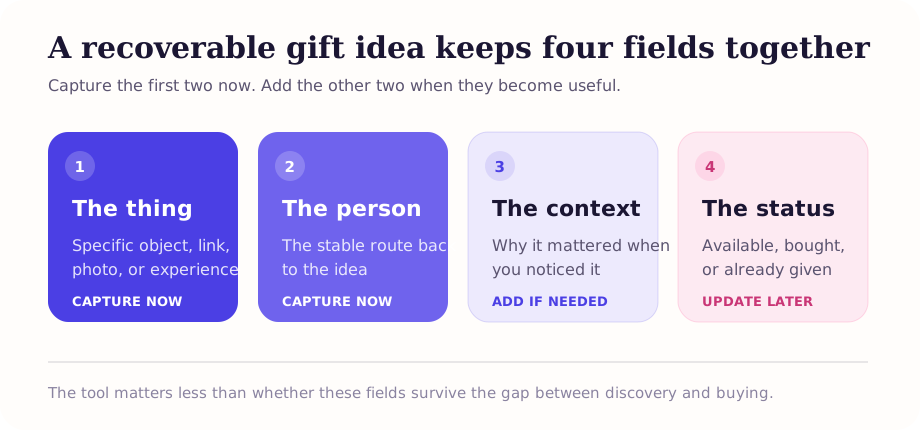
A usable gift idea needs more than the object. It needs a person, enough context to explain the choice, and a lifecycle state.
The person
“Ceramics class” is an interesting object. “Ceramics class for Mum” is a gift idea.
The person’s name is your strongest retrieval cue because it survives across occasions. Birthdays and Christmas come and go. The person remains the stable place where ideas accumulate.
A note called “Christmas ideas” mixes every person into one seasonal pile. A note called “Mum gift ideas” gives every search and every later review a clear boundary.
The context
Context answers why you saved the idea. It can be tiny: “she mentioned it after the market” or “replace the chipped blue one.”
That phrase helps you distinguish a real signal from a random product you liked. It also protects against a common later problem: finding the link but forgetting what made it right.
You don’t need a review, a budget, or an occasion at capture time. Add only the detail your future self couldn’t recover from the product name alone.
The lifecycle state
Lifecycle state answers what happened next. Is the idea still possible? Did you choose it for a birthday? Did you buy it? Did you already give it last year?
A plain line of text doesn’t change itself as the idea moves. You must add a convention, such as an unchecked box for available and a checked box for bought.
Without that convention, old ideas and live ideas look identical. Finding the note only begins a second search through your memory.
This is the real failure. Notes stores the idea, but a blank note doesn’t require its relationships or state.
Why writing it down still helps
External reminders work. The lesson isn’t to trust your memory instead of your phone. It is to build a reminder that can trigger the right memory later.
Sam Gilbert tested external reminders across four online experiments with 1,196 participants. Setting reminders improved performance on delayed intentions. People also created more reminders when memory load or distraction increased (Gilbert, 2015).
Gift ideas are delayed intentions with unusually long gaps. You notice something now and may act months later. In between, dozens of other tasks compete for attention.
The useful part of an external reminder isn’t merely that it exists. It has to appear when you can act and contain enough information to restart the intention.
For gift planning, the person’s name creates the retrieval route. The context restores why the idea mattered. The state tells you what action remains.
Those three details turn storage into a working reminder.
A compact rescue setup for Apple Notes
You don’t need a complicated second brain. Give Notes a small structure that stays easy to use.
- Create one folder called Gift Ideas. Keep every person note inside it. One visible home reduces the need to remember where you filed something.
- Create one note per person. Use a predictable title, such as “Mum gift ideas.” Search starts with the person, not the possible occasion.
- Make every idea a checklist item. Write the specific thing first. Add a link or photo when useful.
- Add one short context cue. Put the source in parentheses: “said she wanted one in April” or “size 38, navy.”
- Check an item only when it is bought or given. Don’t delete it. The checked items become a basic gift history.
The finished note can stay simple:
Mum gift ideas

☐ Ceramics class (mentioned after the spring market)
☐ Blue gardening gloves, size M (hers are torn)
☑ Citrus press (Christmas 2025)
Apple supports tags and Smart Folders if you want another layer. Tags can group notes, while Smart Folders can filter by tags, creation date, edit date, and other conditions (Apple Support).
Use those features only if they remove work. A #gift-ideas tag can gather person notes stored across folders. Several status tags inside one long note won’t track each line separately.
That limitation matters. Notes can filter notes by their properties. It isn’t a database of individual ideas inside each note.
Run one maintenance pass before a busy season. Remove dead links, clarify mystery phrases, and check anything already handled. Then use the Christmas gift planning timeline to decide when collecting should become choosing and buying.
When a dedicated tool becomes worth it
Keep Notes while the setup stays obvious. Change tools when you spend more effort maintaining the convention than using the ideas.
You have probably crossed that line when several of these are true:
- You track ideas for several people and spaces.
- One idea may be considered for different occasions.
- You need to separate available, planned, bought, and given ideas.
- You want reliable gift history without keeping checked lines forever.
- You share a wishlist and need relatives to reserve items privately.
- You keep rebuilding links, photos, prices, and notes into another list.
The sharing requirement is usually decisive. A shared note can show everyone the same text. It doesn’t naturally hide reservations from the person receiving the gift.
If relatives need a list, decide whether they can open and reserve from it without installing anything. Sharing a gift list without another app explains how to test that handoff before sending the link.
A dedicated tool earns its place by making person, context, state, and sharing part of the record. Skarbi is built around that lifecycle, from an unplanned idea to a wishlist and gift history. That is the only product mention this argument needs.
Notes is still the right answer for many people. Software doesn’t become better merely because it has more fields.
Where should you save gift ideas?
The best place to save gift ideas is the smallest system that keeps them useful until the occasion arrives.
For one or two people, Apple Notes can pass that test. Create one folder, one note per person, one context cue per idea, and one rule for checked items. You keep the capture speed without leaving future-you a pile of clues.
For a larger circle, the missing structure becomes visible. You need ideas connected to people, occasions, and states. You may also need a shareable wishlist that protects the surprise.
Don’t move because Notes is bad. Move when the manual structure has become the work. If you have reached that point, the family wishlist apps worth comparing are scored on capture speed first, which is the thing Notes was actually good at.
Start by opening your oldest gift note. Can you name the person, explain why each idea mattered, and tell which ones are still available? If yes, your system works. If not, add the missing cues before you add another idea.
Tagged: gift-planning, notes, wishlist, workflow