How to share a gift list with relatives who won't install an app
By Volodymyr Pavlenko ·
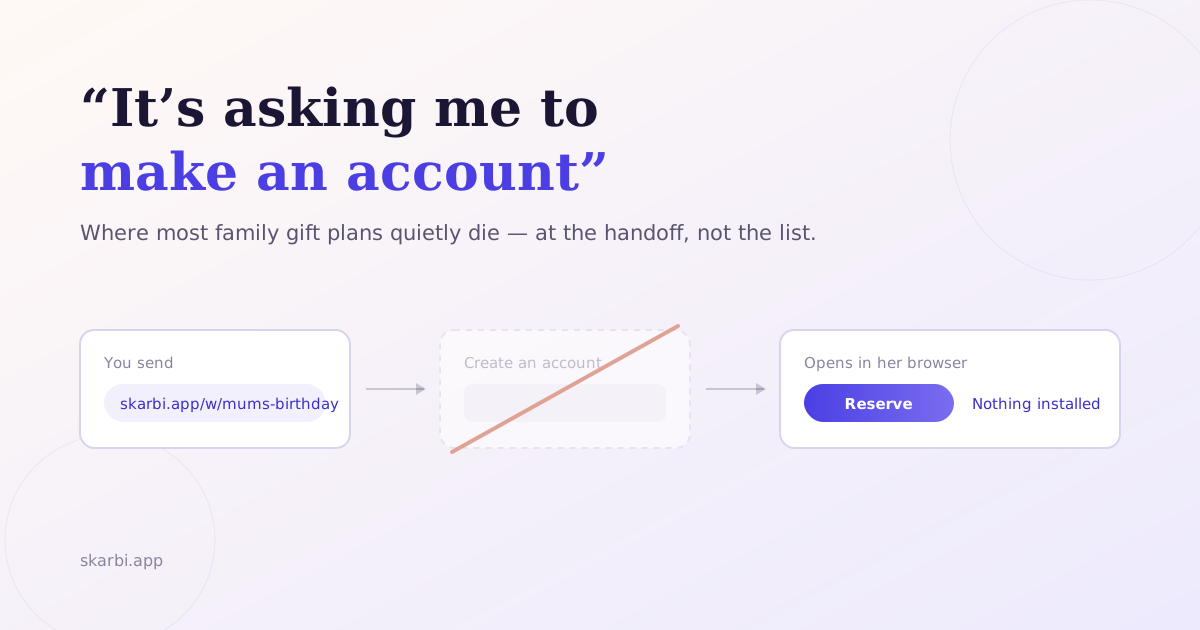
You send the link to the family chat. Twenty minutes later your aunt replies: “it’s asking me to make an account.”
That’s where most family gift plans quietly die. Not at the list — at the handoff. You did the organising, and the tool put a registration form between your relatives and the thing you needed them to do.
The fix isn’t finding more patient relatives. It’s picking a method where reserving a gift requires nothing of the person reserving it.
The short version
Most gift list tools advertise “no sign-up” and mean it only for you, the person making the list. Your relatives still hit a registration wall when they try to reserve something. If you want a list a 70-year-old can open from a text message and use immediately, you need a tool where reserving is anonymous by design. Test any tool before you send it: open your own share link in a private browser window and try to claim an item.
“No sign-up” usually means you, not them
There are two separate walls in every gift list tool, and only one of them gets advertised.
The first wall is viewing. Almost every tool clears this one. Your relative taps the link, the list opens in their browser, they can read it. Fine.
The second wall is claiming — marking an item as “I’m buying this.” This is where accounts appear, because claiming writes data, and writing data usually means identifying who wrote it.
That second wall is the one that matters. A list nobody can claim from is a suggestion box. It tells your family what to buy, but it doesn’t stop two of them buying the same thing. The whole reason to share a list instead of a text message is the claiming.
So when a product says “no sign-up required,” find out which wall it’s talking about. Usually it’s the first.
The test takes thirty seconds. Open your own share link in a private or incognito browser window, so you’re logged out. Try to reserve something. Whatever you hit, your relatives will hit. Do this before you send the link, not after your aunt does it for you.
Your relatives can use apps. They just won’t install yours.
The “tech-shy grandma” framing is mostly wrong, and it leads people to the wrong solution.
Smartphone ownership among older adults is near-universal now. AARP’s 2026 technology trends report found that 90% of adults aged 50 and over own a smartphone, up from 55% in 2016. That’s a survey of 3,838 US adults, fielded 9 September to 6 October 2025 (AARP).
Pew Research Center puts ownership among adults 65 and over at 78%. Their figure comes from 5,022 US adults surveyed between 5 February and 18 June 2025 (Pew Research Center).
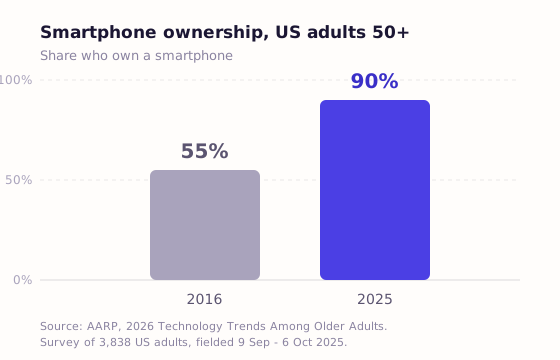
So the device isn’t the barrier. The barrier is what you’re asking them to do with it.
The same AARP research found adults 50 and over use an average of 10 different apps over a three-month period. Ten. That’s a settled, working set — messaging, banking, maps, a couple of shops. You are not asking your relative to learn technology. You’re asking them to make your app the eleventh, for one birthday, and then never open it again.
That’s a reasonable thing to decline. I’d decline it.
Two more findings from the same survey explain why the ask lands badly. Three in five adults 50-plus say technology is not designed with their age in mind. And the single biggest barrier to adopting something new is data privacy — not confusion, not capability. An unexpected “create an account” screen, for a gift, from a brand they’ve never heard of, hits exactly that concern.
Design around this instead of around imagined incompetence. The goal is that your relative’s first action is tapping a link in a message, and their second action is done.
What actually works: four options, honestly ranked
Four methods clear the no-install bar. They trade off on one axis: whether they can prevent duplicates.
| Method | Opens in browser | No guest account | Prevents duplicates | Hides who reserved | Works with any store |
|---|---|---|---|---|---|
| Shared note or spreadsheet | Yes | Yes | No | No | Yes |
| Printed page or PDF | Yes | Yes | No | No | Yes |
| Retailer wishlist | Yes | Partly | Partly | Sometimes | No |
| Wishlist tool with guest reservation | Yes | Yes | Yes | Yes | Yes |
A shared note or spreadsheet is the most reliable thing on this list. No vendor, no account, no outage, works on everything. It’s what ChatGPT and Google’s AI Overview both recommend when you ask them this question. Its only real weakness is claiming: either everyone sees who took what, or nobody records anything at all. If your family is small and talks constantly, this genuinely might be enough. Don’t let anyone sell you software you don’t need.
A printed page or PDF sounds primitive and solves a real case. If a relative has no smartphone — and 22% of adults 65 and over don’t — paper works. It’s also the only option on this list that never breaks.
A retailer wishlist, like Amazon’s, opens in a browser and has a purchase-tracking mechanic. Two catches: it locks the list to one shop, and some actions still push guests toward an account. Worth it if your family already shops there anyway.
A wishlist tool with anonymous guest reservation is the only option that both prevents duplicates and keeps the buyer private. It’s also the category where the “no sign-up” claim is least reliable, so apply the private-window test. For how seven of these tools actually compare, I went through them in detail in Best Wishlist Apps for Families in 2026.
The duplicate problem is the whole reason to bother
If you don’t need duplicate prevention, stop reading and use a spreadsheet. It’s free and it works.
Returns are a normal, large part of how retail works. The National Retail Federation and Happy Returns estimated US consumers would return $849.9 billion of merchandise in 2025, or 15.8% of annual sales. Online purchases came back at 19.3%, and retailers expected 17% of holiday sales to be returned. The figures were published 15 October 2025, from surveys of 2,006 consumers and 358 ecommerce professionals (NRF).
That figure covers all returns, not gift duplicates. Nobody publishes a clean number for “two aunts bought the same Lego set.” But it establishes the shape of the season. A lot of what gets bought comes back, and the duplicate is the slice you can prevent in advance.
Preventing it takes one specific mechanic. Other givers must see that an item is taken, while the recipient must not. Get the second half wrong and opening the list becomes a spoiler. I wrote about how that mechanic works, and which tools get it wrong, in How to avoid duplicate gifts in a family.
Setting it up so the least technical person succeeds
Six things, in order of how much they matter.
- Send it where they already are. The family chat, SMS, WhatsApp — whatever thread they read. Not email, unless email is genuinely their channel.
- Send one link, not one per person. Every extra link is an extra chance to open the wrong one.
- Say in the message that no account is needed. They will assume otherwise, because everything else asks. One sentence prevents the reply you’d otherwise get twenty minutes later.
- Put photos on a few items. A page of text links is hard to parse. A page with pictures is obvious at a glance.
- Keep the list short enough to read on one screen. Long lists get skimmed and then abandoned.
- Print it for anyone without a smartphone. Takes two minutes and removes a person from the problem entirely.
One more reason to keep it light: Pew found 17% of adults 65 and over are smartphone-dependent. They have a phone but no home broadband, so it’s their only way online. For them, a page that loads fast on mobile data isn’t a nicety. Anything heavy is a real cost.
Building the list for someone who can’t build their own — a child, most obviously — is a different problem. There, the ownership model matters as much as the share flow. I covered it in how to make a wishlist for your child.
Where this doesn’t work
Three cases where you should use something else.
Your family shops one store anyway. If everyone buys from Amazon, an Amazon wishlist is less friction than introducing a new tool. Fewer moving parts wins.
You need a real registry. Weddings and baby showers come with shipping addresses, thank-you tracking, and completion discounts. Dedicated registries handle that. A general wishlist doesn’t, and pretending otherwise creates work later.
The list-maker is on Android. Worth being direct here, because it’s the limitation of the tool I build. Skarbi is iPhone-only for the person building the list. Guests are fine anywhere — they get a browser link and never install anything — but if you’re on Android, it isn’t for you yet.
That last point deserves the obvious objection: isn’t recommending an app that needs installing exactly the problem this post is about?
No, and the distinction is the whole argument. One person installs something, because one person wants a system that survives the year. Everyone else taps a link and is done in a tap. The failure mode is asking all fifteen relatives to install and register. Asking the one person who’s already doing the organising is a different question entirely.
And if nobody in your family wants that system, use the spreadsheet. That’s not a consolation prize. For a lot of families it’s the right answer.
What to do next
The constraint that matters isn’t how technical your family is. It’s whether the tool asks anything of the people receiving your link.
- Run the private-window test on whatever you’re using now. Thirty seconds, and it tells you what your relatives will actually hit.
- If claiming needs an account, you have a suggestion box, not a coordinated list.
- If you don’t need duplicate prevention, a shared note is genuinely fine.
- If you do, pick for anonymous guest reservation, then verify it rather than trusting the marketing copy.
Send the link where they already read messages, say no account is needed, and print it for anyone without a smartphone. That’s the whole method.
One thing on timing: if this is for Christmas, share it before Black Friday, not after. Coordination only helps while people still have buying left to do.
And a list is only as good as what went into it. If yours is thin because the ideas arrived in March and were gone by November, the fix is upstream of sharing — keeping track of gift ideas all year is the part that makes the link worth sending.
Tagged: wishlist, family, gift-planning, sharing